Odin AI Review 2026 My Honest Experience After 2 Days of Use
- July 5, 2026
- No Comments
Let me be honest with you right from the start. I’ve reviewed more AI tools over the past two years than I can comfortably count, and most of them blur together after a while. Another chatbot. Another writing assistant. Another “revolutionary” tool that, at the end of the day, still leaves you doing most of the actual work yourself. So when Odin AI landed on my desk with the bold claim that it doesn’t help with your work – it removes it – I’ll admit I raised an eyebrow.
But here’s the thing. After spending real time with it, digging into how it’s built, and comparing it against the current wave of AI agents charging $200 a month for cloud-hosted automation, I can say this much: Odin AI is genuinely doing something different. Not perfect – no tool is – but different in a way that matters, especially if you’re a freelancer, agency owner, content creator, or small business operator who is tired of renting AI power by the month.
In this Odin AI review, I’m going to walk you through exactly what this software is, how it works, what makes it stand apart from the crowded AI agent space, who should buy it (and who honestly shouldn’t), the full pricing funnel, and my final verdict. By the end, you’ll know whether Odin AI deserves a spot on your computer or a pass. Let’s get into it.
What Is Odin AI?
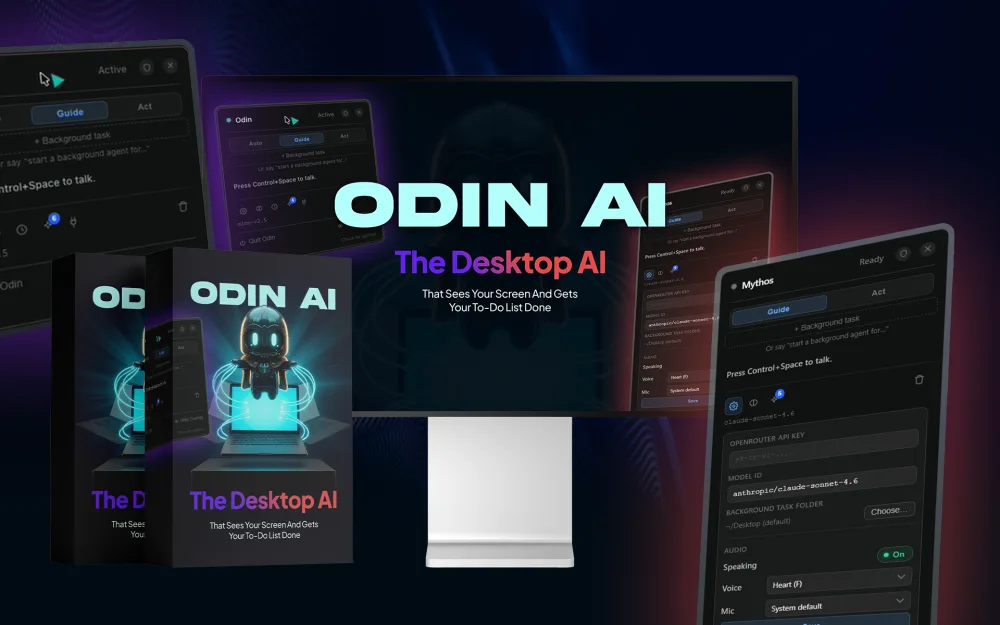
Odin AI is a desktop AI agent for Mac and Windows that doesn’t just talk – it takes the keyboard. That’s the simplest way I can describe it. You press a single keystroke, the app opens, it instantly sees what’s on your screen, and from there it can deploy what the creators call an “army of AI agents” to actually complete tasks for you – visibly, on your own machine, while you go do something else.
If you’ve used tools like ChatGPT or Claude in a browser tab, you already know the usual routine: you ask a question, you get an answer, and then you copy, paste, format, click, and assemble everything yourself. Odin flips that dynamic. Instead of handing you ingredients, it cooks the meal. It clicks the buttons, types the text, navigates the tabs, and delivers a finished result – a written proposal, a research document, a content calendar, even a complete faceless video – without you babysitting the process.
What struck me most during testing wasn’t just the automation itself. Plenty of tools claim automation these days. It was the fact that everything happens right in front of you, on your own screen, inside your own logged-in accounts. There’s something oddly reassuring about watching the cursor move and the work get done in real time, rather than trusting some invisible server in a data center you’ll never see.
The Big Difference: It Runs on YOUR Computer, Not Someone Else's Server
This is the part of the review where I need you to slow down and pay attention, because it’s the single biggest thing separating Odin AI from almost every other AI agent being sold right now.
Most AI agents on the market today run entirely on someone else’s infrastructure. You log into a remote browser, or you get access to a hosted instance you can’t actually see, and you pay handsomely for the privilege – often around $200 per month. Your passwords get handed over to a remote environment. Your tasks run inside a black box. And if the company behind it raises prices, changes terms, or shuts down, you’re left holding nothing.
Odin takes the opposite approach, and honestly, it’s refreshing. The app, the screen-reading, and the browser automation all happen locally, on your machine, inside your own already-logged-in sessions. Every single action is visible on your screen as it happens. There’s no remote browser asking for your credentials, no always-on hosted instance quietly billing you, and no mystery about what the AI is actually doing.
Then there’s the brain of the operation. Odin connects to AI models through OpenRouter, which means you choose which model powers it. Want to run a premium model for important client work? Go ahead. Want to use a free or ultra-cheap model for routine research tasks? That works too. In practice, this usually costs a few cents a day – a far cry from the fixed monthly fees most competitors lock you into.
And the software itself? One-time price. Not a subscription. I’ll say that again because it’s rare enough in 2026 to feel almost suspicious: you pay once, and you own it. For anyone who has watched their monthly software stack balloon into hundreds of dollars, that alone makes Odin worth a serious look.
Odin AI - $37
Odin AI Personal license at $37 gets you the core desktop app with all three modes. For most individuals, that's genuinely usable on its own – it isn't a crippled demo designed to force upgrades, which I appreciate.
Visit Official Site + Bonus!How Odin AI Works: The Three Modes Explained
Odin AI operates in three distinct modes, and understanding them is key to understanding the product. Each mode represents a different level of hands-off automation, so you can pick how much control you want to give up.
1. Guide Mode – Your On-Screen Instructor
Guide Mode is the gentlest of the three. Instead of taking over, Odin overlays step-by-step instructions directly on your screen, showing you exactly what to click and where to go. Think of it as having a patient expert standing behind your shoulder, pointing at your monitor.
This mode is brilliant for learning new software, following complicated processes, or situations where you want to stay in control but don’t want to keep switching between a YouTube tutorial and your actual work. It’s also a smart on-ramp for people who feel nervous about letting an AI touch their computer. You do the clicking; Odin does the thinking.
2. Act Mode – Hands-Free Task Completion
Act Mode is where things start to feel a little like science fiction. In this mode, Odin takes control of your mouse and keyboard and completes tasks itself – clicking, typing, navigating, and finishing the job while you watch. Ask it to fill out a form, organize files, draft and send responses, or work through a repetitive process, and it just… does it.
The first time I watched it work through a multi-step task on its own, I had that strange mix of delight and mild unease that comes with genuinely new technology. But because everything happens visibly on your own screen, you can interrupt at any moment. You’re never locked out of your own machine, and that transparency builds trust fast.
3. Background Agent Mode – The Centrepiece
This is the mode Odin AI is really built around, and it’s the one that justifies the hype. Background Agent Mode lets you hand off an entire task – not a step, a task – and simply walk away. Client proposals, competitor research reports, month-long content calendars, cold outreach sequences, full faceless videos ready to upload. You describe what you need, and you come back to it done.
Even better, you don’t need to be at your computer to start a job. Odin lets you fire off tasks from your phone over Telegram. Sitting on the sofa and suddenly remember you need a competitor analysis by tomorrow? Send a message from your phone. Stuck in the car waiting for the kids? Kick off a content batch. When you get back to your desk, the deliverable is waiting for you. That phone-to-desktop workflow is, in my opinion, one of the most quietly powerful features in the entire package – it turns dead time into productive time without you lifting more than a thumb.
Conquests: Solving the "Blank Screen" Problem on Day One
Here’s a dirty little secret about powerful AI tools: most people buy them, open them, stare at the empty prompt box, and have absolutely no idea what to ask for. The tool is capable of amazing things, but the user doesn’t know where to start. The industry calls it the blank-screen problem, and it kills more AI subscriptions than bad output ever does.
Odin AI tackles this head-on with something it calls Conquests – a built-in library of named, ready-to-run, done-for-you tasks spanning content creation, outreach, research, agency work, hiring, and more. Instead of inventing a prompt from scratch, you simply pick a Conquest, describe your specific context (your niche, your client, your goal), and walk away while Odin executes.
In practice, this means that on day one – within minutes of installing – you can have Odin producing real, usable deliverables without any prompt-engineering skill whatsoever. For beginners, that’s the difference between a tool that gathers dust and a tool that pays for itself in the first week. For experienced users, Conquests act as reliable templates you can customize and chain together.
What Can You Actually Do With Odin AI? Real-World Use Cases
Specs and modes are nice, but what matters is what lands in your outputs folder. Based on the built-in Conquest categories and my own testing, here’s a realistic picture of what Odin AI handles well:
- Client proposals: Hand it the client’s details and requirements, and get back a polished, structured proposal ready to send – a genuine time-saver for freelancers and agencies.
- Competitor research: Odin browses, gathers, and compiles competitor information into organized reports while you focus on strategy instead of tab-hopping.
- Content calendars: Full publishing schedules mapped out across platforms, complete with topics and angles tailored to your niche.
- Outreach sequences: Multi-step cold email and follow-up sequences written and structured for you – one of the most tedious jobs in any sales-driven business, gone.
- Faceless videos: Complete faceless video content produced end-to-end, which is a serious asset for YouTube automation channels and short-form content businesses.
- Hiring and agency operations: Job posts, candidate screening prep, client onboarding documents – the unglamorous paperwork that eats entire afternoons.
The pattern across all of these is the same: tasks that used to consume hours of your focused attention become things you delegate in one message and collect later. That’s not a productivity boost; that’s a workload transfer, and it’s exactly what the marketing promises.
Who Is Odin AI For (And Who Should Skip It)?
No honest review is complete without drawing this line clearly, so here’s mine.
Odin AI is a strong fit if you are:
- A freelancer or solopreneur drowning in proposals, research, and content production, who would rather pay once than add another subscription.
- An agency owner who needs deliverables produced at scale and wants an assistant that works on real screens, in real accounts, visibly.
- A content creator or faceless channel operator looking to systemize video and calendar production.
- A privacy-conscious user who is uncomfortable handing logged-in sessions and passwords to remote, hosted AI browsers.
- Someone burned by $200/month agent tools who wants comparable capability at a one-time price plus pennies-per-day model costs.
You should probably skip it if you are:
Odin AI Pricing: The Full Funnel Breakdown
Odin AI is sold as a one-time purchase with optional upgrades – the classic front-end plus OTO (one-time offer) structure. Here’s the complete funnel so there are no surprises at checkout:
|
Plan
|
What You Get
|
Price
|
Access
|
|---|---|---|---|
|
Front End
|
Odin AI Personal
|
$37 (one-time)
|
|
|
OTO 1
|
Odin AI Pro Unlimited
|
$297
|
|
|
OTO 2
|
Odin's Conquest Pack
|
$97
|
|
|
OTO 3
|
Odin AI Agency License
|
$397
|
|
|
Bundle – Silver
|
Silver
|
$297
|
|
|
Bundle
|
Gold
|
$497
|
|
|
Max
|
(Full-Funnel Path)
|
$828
|
Let’s unpack that. The front-end Odin AI Personal license at $37 gets you the core desktop app with all three modes. For most individuals, that’s genuinely usable on its own – it isn’t a crippled demo designed to force upgrades, which I appreciate.
Odin AI Pro Unlimited ($297) removes limits for heavy users who plan to run agents constantly. Odin’s Conquest Pack ($97) expands the ready-to-run task library, which is worth it if you want maximum done-for-you coverage across niches. The Agency License ($397) lets you use Odin in client-serving contexts – an easy yes if you bill clients for the deliverables Odin produces, since a single client project can recoup it.
The Silver Bundle ($297) and Gold Bundle ($497) package the upgrades at a discount, and the Max full-funnel path totals $828 if you take everything. Compare that one-time figure against a $200/month hosted agent – which runs to $2,400 in the first year alone – and the math tilts heavily in Odin’s favor, even at the top of the funnel.
One more cost note that buyers often miss: because the AI brain runs through OpenRouter on the model of your choice, your ongoing cost is whatever you choose to spend on model usage. Frugal users can run free models and pay essentially nothing; power users typically report a few cents a day. Either way, you control the meter – nobody else does.
Odin AI Pros and Cons: My Honest Take
What I genuinely like:
- Local-first design: Runs on your own machine, in your own sessions, with every action visible. No black box, no credential hand-off.
- One-time pricing: In a subscription-saturated market, paying once is a legitimate competitive advantage.
- Model freedom via OpenRouter: You pick the engine and the cost – paid, cheap, or free.
- Three graduated modes: Guide, Act, and Background Agent let you scale trust at your own pace.
- Telegram remote control: Firing off tasks from your phone and returning to finished work is a workflow-changer.
- Conquest library: Eliminates the blank-screen problem for beginners from day one.
What could be better:
- Since it runs locally, your computer needs to be on for Background Agent tasks to execute – that’s the trade-off for not renting a cloud instance.
- The best results still depend on clear task descriptions; brand-new users have a short learning curve before their instructions get sharp.
- The full funnel adds up if you want everything, so plan your upgrade path deliberately rather than impulse-buying every OTO.
Odin AI vs. Cloud-Based AI Agents: A Quick Reality Check
It’s worth putting Odin side by side with the hosted agents dominating the conversation right now. Cloud agents give you a remote browser or hosted instance: convenient in some ways, but you pay roughly $200 every month, you log your accounts into their environment, and the entire operation is invisible to you. If they hike prices, you pay. If they go down, you wait. If they get breached, your sessions were in the blast radius.
Odin’s answer is architectural, not cosmetic. Your machine, your logged-in sessions, your screen, your choice of model, your one-time payment. The trade-offs are real – your computer does the work, so it needs to be running – but the ownership, transparency, and cost profile are dramatically better for the typical solo operator or small team. For most of the people this product targets, that trade is a no-brainer.
Final Verdict: Is Odin AI Worth It in 2026?
After putting Odin AI through its paces, here’s where I land: this is one of the few AI agent products whose core pitch survives contact with reality. The promise – “the first AI that doesn’t help with the work, it removes it, right on your own computer where you can watch every step” – is marketing language, sure, but the architecture actually backs it up.
The local-first design solves the two biggest objections to AI agents in one stroke: privacy (no remote browser holding your passwords) and cost (no $200/month meter running whether you use it or not). The three-mode system gives cautious users a comfortable on-ramp, the Conquest library means beginners produce real deliverables on day one, and the Telegram integration quietly turns your phone into a remote control for your entire workload.
At $37 for the front end, the risk-to-value ratio is about as favorable as it gets in this space. If the tool saves you a single afternoon of proposal writing or research, it has paid for itself. My honest recommendation: start with the Personal license, run a few Conquests on your real work, and upgrade only where you feel actual friction. For freelancers, agencies, and content operators especially, Odin AI is an easy recommendation – and a rare example of an AI product that respects both your wallet and your machine.
Quick Tips to Get the Most Out of Odin AI
If you do pick it up, a few small habits will dramatically improve your results from the very first week. First, start in Guide Mode for a day or two. It builds your intuition for how Odin “thinks” about your screen, and that intuition makes your later hand-offs far more precise. Second, when you move to Background Agent Mode, front-load your context: tell it who the client is, what the goal is, and what a finished result looks like. The extra thirty seconds of description routinely saves an entire revision cycle.
Third, lean on Conquests before writing custom tasks. They’re battle-tested starting points, and editing a working template is always faster than inventing from zero. Finally, set up the Telegram connection on day one, even if you don’t think you’ll use it. The first time an idea strikes you away from your desk and you fire it off from your phone, you’ll understand why this feature deserves more attention than it gets in the sales page.
Frequently Asked Questions (FAQs)
Does Odin AI work on both Mac and Windows?
Yes. Odin AI is a native desktop app for both Mac and Windows, activated with a single keystroke.
Is Odin AI a monthly subscription?
No. The software is a one-time price starting at $37. Your only ongoing cost is optional AI model usage through OpenRouter – typically a few cents a day, or free if you choose free models.
Is it safe to let Odin control my computer?
Everything runs locally and visibly on your own screen, inside your own logged-in sessions. You can watch every action and interrupt at any time – no remote servers or password hand-offs.
Can I use Odin AI without being at my computer?
Yes. You can send tasks from your phone via Telegram, and Background Agent Mode completes them on your machine while you’re away.
Do I need prompt-writing skills to use it?
No. The built-in Conquest library offers ready-to-run, done-for-you tasks – just pick one, add your context, and walk away.

Latest Digital Content